Aquaplanet with a fixed SST
Now that you’ve ported CESM successfully to Keeling and have been able to validate your port and run some example tests, where do you start? With this example, hopefully you can get a sense for how you can adjust parameters within CESM and run tests.
This tutorial assumes you’ve been able to complete porting cesm and out of the box capability.
Introduction
An aquaplanet component set is typically an atmosphere only model where it’s assumed that the Earth is a ball of water with no land and usually no sea ice. This simplified model can help us parse atmospheric interactions with the surface ocean very easily.
Here, we’ll be going over how to change the sea surface temperature in order to see how the atmosphere is disturbed.
This tutorial partially follows the UCAR example for the CAM5 physics model.
Creating a new case
Like usual, you’ll want to start with creating a case in cesm1.2.1/scripts:
./create_newcase -case aqua_testperturb -compset FC5AQUAP -res f19_f19 -mach keeling
case aqua_testperturb: This is the case name, which you can set to anything. Here, it’s aqua_testperturb
compset FC5AQUAP: This is the component set. We’re using the CAM5 aquaplanet compset.
res f19_f19: Our resolution. Ours is around 2 deg. x 2 deg.
mach keeling: Our machine that we set up here <out_of_box_cesm>.
Changing the sea surface temperature
For the purposes of this example, we want to change our sea surface temperature (which is fixed throughout the whole simulation) so that it’s slightly hotter at the equator, like below. (Plotted with Python)
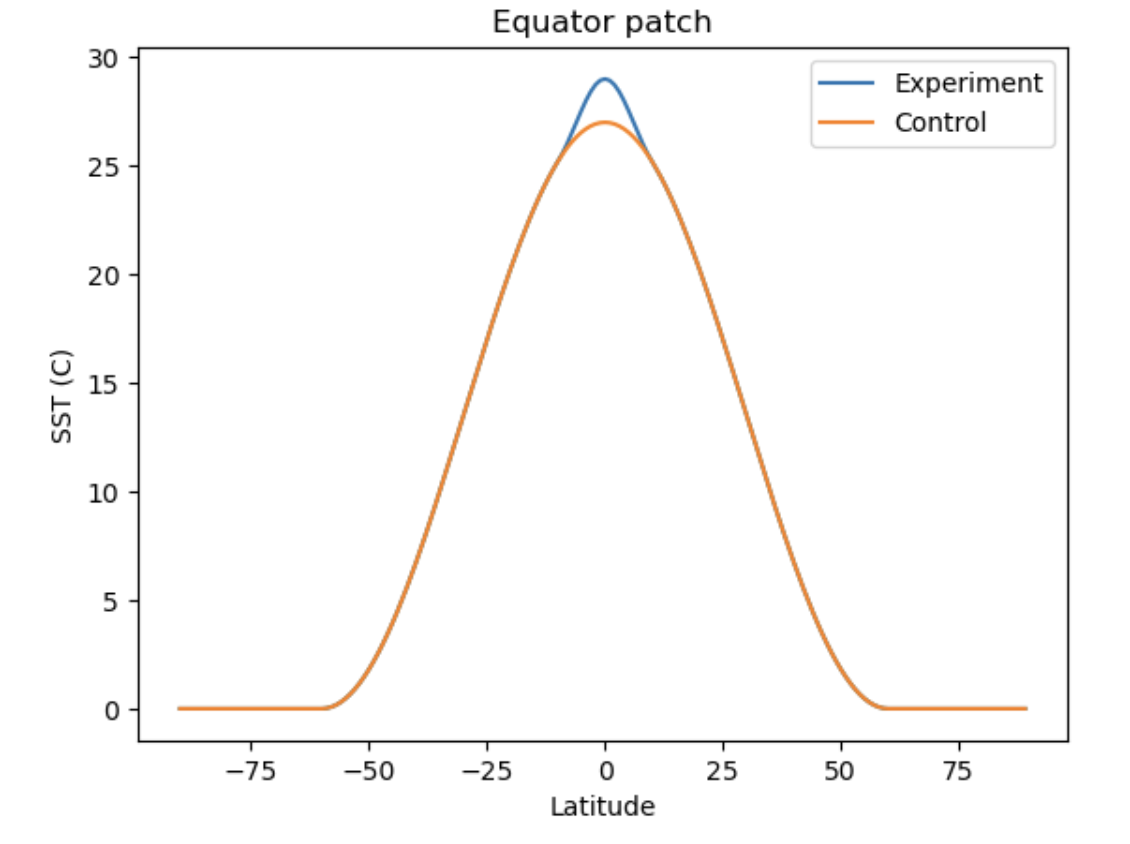
Each variable is different in how it can be changed. Many can be changed through using xml files given in the case directory. However, sea surface temperature (SST) must be manually changed.
Go to /cesm1.2.1/models/atm/cam/src/utils/cam_aqua/ocn_comp.F90
This fortran file has many kinds of sea surface conditions to choose from, which you do by setting sst_option in the interface near the top of the script.
First, save a copy of the original ocn_comp.F90 file for reference: cp ocn_comp.F90 /cesm1_2_1/scripts/aqua_testperturb/SourceMods/src.aquap
In ocn_comp.F90, we’ll edit SST option 6 since it’s closest to what we want. We’ll write out in Fortran the specific perturbation we want.
The formula is:
where \(\phi\) is latitude, \(\phi_p\) is where the peak of our perturbation will be (the equator), and \(\phi_w\) is the half-width (10 degrees latitude).
if(sst_option == 6) then
   do lchnk=begchunk,endchunk
      call get_rlat_all_p(lchnk,pcols,rlat)
      call get_rlon_all_p(lchnk,pcols,rlon)
      ncols = get_ncols_p(lchnk)
      do i=1,ncols
         if(abs(rlat(i)) < lat00+latrad10 .AND. abs(rlat(i)) > lat00-latrad10) then
            tmp1 = cos((abs(rlat(i))-lat00)*pi*0.5_r8/latrad10)
            tmp1 = tmp1*tmp1
            sst(i,lchnk) = sst(i,lchnk) + t_2*tmp1
         end if
      end do
   end do
end if
Make sure to change all relevant variables to the values you want. latrad10 (\(\phi_w\)) is 10._r8*pio180, t_2 (A) is 2._r8, and lat00 (\(\phi_p\)) is 0._r8*pio180 (equator).
sst(i,lchnk) is initially the control SST.
Building the case
You can go back to your case directory (/cesm1.2.1/scripts/aqua_testperturb) and run ./cesm_setup now.
If you find yourself needing to redo the SST after having already done this, you can run
./cesm_setup -clean
./cesm_setup
after rewriting ocn_comp.F90. This should refresh the SST and allow you to run with the newly adjusted values.
We want to fix the orbit to certain values to follow the example of other CESM aquaplanet simulations. In user_nl_cpl, add these following lines to the end:
orb_eccen = 0.
orb_obliq = 0.
orb_mvelp = 0.
orb_mode  = 'fixed_parameters'
In the env_build.xml file, change the CAM_CONFIG_OPTS setting to look like below. The microphysics mg1.5 setting isn’t required, but it uses an updated version of the microphysics.
<entry id="CAM_CONFIG_OPTS" value="-phys cam5 -ocn aquaplanet -microphys mg1.5" />
Build the case: ./aqua_poleperturb.build
If the build fails, fix any errors and then clean before building again: ./aqua_poleperturb.clean_build.
Testing the Input
We plan to run the simulation for 20 years. But this takes a while, and what if our input wasn’t put in correctly? It might be best then to run a very short simulation first in order to validate that the input is correct.
In env_run.xml, set the following variables as so:
<!--"sets the run length with STOP_N and STOP_DATE (must be nyear(s) for _GLC compsets for restarts to work properly), valid values: none,never,nsteps,nstep,nseconds,
nsecond,nminutes,nminute,nhours,nhour,ndays,nday,nmonths,nmonth,nyears,nyear,date,ifdays0,end (char) " -->
<entry id="STOP_OPTION"   value="ndays"  />

<!--"sets the run length with STOP_OPTION and STOP_DATE (integer) " -->
<entry id="STOP_N"   value="50"  />

<!--"CAM namelist use_case (char) " -->
<entry id="CAM_NML_USE_CASE"   value="aquaplanet_cam5"  />
The simulation will run for 50 days, which should take an hour or two on Keeling, compared to the 3 days that 20 years can take.
CAM_NML_USE_CASE will assure that we’re using cam5 physics for our simulation.
Note: You can use the command xmlchange in order to change the values in the xml files: ./xmlchange entry_id=value
Example: ./xmlchange STOP_OPTION=ndays
Now we can let the simulation run: sbatch aqua_poleperturb.run
If you’ve set up your output like here, you should find your output in $OUTPUT_ROOT/aqua_testperturb/outputdata/atm/hist.
Try plotting surface temperature:
import xarray as xr
import matplotlib.pyplot as plt

test = xr.open_dataset('/data/keeling/a/mailes2/a/CESM_DATA/aqua_equator20wide/outputdata/atm/hist/aqua_equator20wide.cam.h0.0001-02.nc')
control = xr.open_dataset('/data/keeling/a/pappup2/a/CESM/cam5_new/CESM_output_data/atm/hist/cam5_new.cam.h0.0005-12.nc')
control_TSmean = control.TS.mean('lon')
test_TSmean = test.TS.mean('lon')
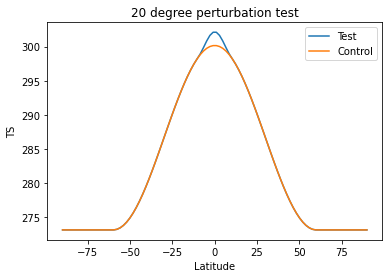
(Control isn’t needed, but it’s here for reference)
If the SST input looks good, you can now run your simulation for the full twenty years!
<!--"sets the run length with STOP_N and STOP_DATE (must be nyear(s) for _GLC compsets for restarts to work properly), valid values: none,never,nsteps,nstep,nseconds,
nsecond,nminutes,nminute,nhours,nhour,ndays,nday,nmonths,nmonth,nyears,nyear,date,ifdays0,end (char) " -->
<entry id="STOP_OPTION"   value="nyears"  />

<!--"sets the run length with STOP_OPTION and STOP_DATE (integer) " -->
<entry id="STOP_N"   value="20"  />
sbatch aqua_poleperturb.run
Continuing your run
If you’d like to continue your run for a longer period of time, say you start by running for 20 years and need 30 total years of simulation, then you can continue your simulation from the last stopping point.
In env_run.xml:
<!--"sets the run length with STOP_N and STOP_DATE (must be nyear(s) for _GLC compsets for restarts to work properly), valid values:       none,never,nsteps,nstep,nseconds,nsecond,nminutes,nminute,nhours,nhour,ndays,nday,nmonths,nmonth,nyears,nyear,date,ifdays0,end (char) " -->
<entry id="STOP_OPTION"   value="ndays"  />

<!--"sets the run length with STOP_OPTION and STOP_DATE (integer) " -->
<entry id="STOP_N"   value="180"  />

...

<!--"A setting of TRUE implies a continuation run, valid values: TRUE,FALSE (logical) " -->
<entry id="CONTINUE_RUN"   value="FALSE"  />